Best Ethernet Cable for Gaming in 2026 (Cat6 vs Cat7 vs Cat8)
What Is the Best Ethernet Cable for Gaming in 2026?
For most players, Cat6. It supports up to 10 Gbps, handles every home internet plan available today, and costs between $8 and $15 for a quality run. Cat7 and Cat8 cable specifications look impressive on paper, but they deliver zero additional gaming benefit for the overwhelming majority of home setups. Your ping is the same on Cat5e as it is on Cat8 if you are running a 1 Gbps connection under 100 meters.
That is the honest answer. The rest of this guide explains why, covers the cases where Cat7 or Cat8 actually make sense, and helps you pick the right cable for your specific setup.
Does Ethernet Cable Category Affect Gaming Performance?
Cable category affects bandwidth, not latency. A Cat8 cable will not lower your ping compared to a Cat6 cable on the same network. What changes between categories is how much data the cable can carry at once.
For gaming, latency and stability matter more than raw bandwidth. Most home internet plans, even fast ones, fall well within what a Cat6 cable can handle. This is why the best ethernet cable for gaming is often the simplest one, not the most expensive.
Your router, modem, and ISP plan set the real speed ceiling. A faster cable cannot exceed what your other hardware supports.
Your internet provider matters just as much as your Ethernet cable. If you’re using satellite internet, read our Is Starlink Good for Gaming? guide to see how it performs for online gaming.
What’s the Difference Between Cat6, Cat7, and Cat8?
Cat6
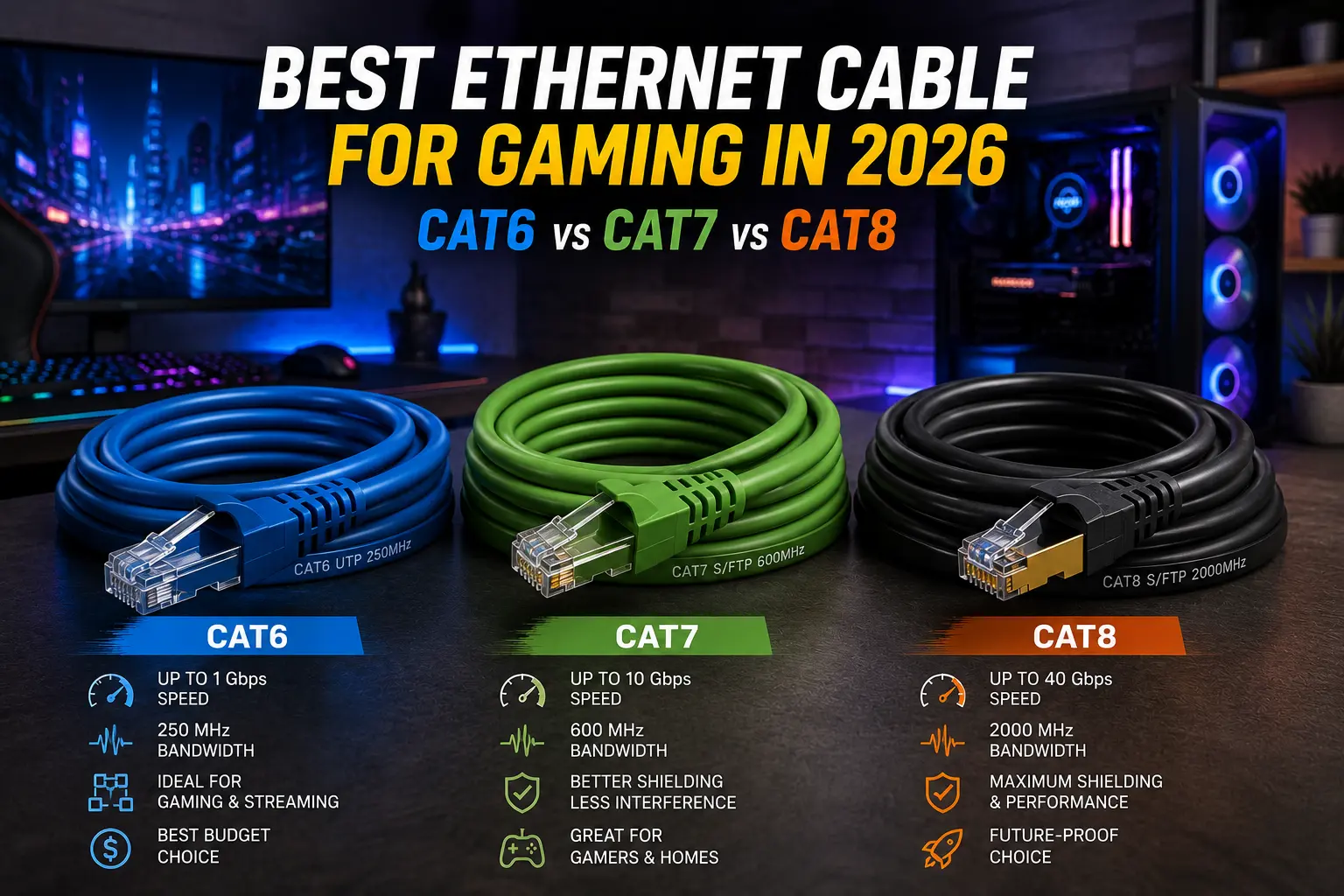
Cat6 supports speeds up to 10 Gbps at short distances and around 1 Gbps at longer runs. This covers nearly every home gaming setup. It is affordable, widely available, and easy to install.
Cat6a
Cat6a is an upgraded version of Cat6. It supports 10 Gbps over longer distances, up to 100 meters, with better shielding against interference. This makes it a smart choice for larger homes or setups with a long cable run.
Cat7
Cat7 supports similar speeds to Cat6a but often uses non-standard connectors. Many Cat7 cables sold for home use are not fully compliant with the original Cat7 standard, which can cause compatibility issues with standard RJ45 ports on PCs and consoles.
Cat8
Cat8 supports up to 40 Gbps, but only over short distances of around 30 meters. It was designed for data centers, not home networks. For nearly all gaming setups, Cat8 is unnecessary and expensive overkill.
Which Cable Should You Buy?
For most gamers, Cat6 is what ethernet cable is best for gaming. It handles current internet speeds with room to spare and costs a fraction of higher categories.
Choose Cat6a if you have a long cable run, a gigabit-plus internet plan, or want extra shielding against interference. Skip Cat7 unless you specifically need its shielding and can confirm connector compatibility with your hardware. Skip Cat8 entirely unless you are working with equipment that actually requires it.
Does Cable Length Affect Ethernet Performance?
Cable length affects signal quality more than most people expect. A well-made Cat6 cable at a proper length often outperforms a poorly made Cat8 cable of the same length.
Shielding matters if your cable run passes near power lines, large appliances, or other sources of electromagnetic interference. For most home setups, unshielded cables work fine. Shielded cables (STP or S/FTP) add protection in noisier environments.
How Do Cat6, Cat7, and Cat8 Compare?
| Category | Max Speed | Max Distance (Full Speed) | Best For |
| Cat6 | 10 Gbps (short range) | Up to 55 meters at 10 Gbps | Most home gaming setups |
| Cat6a | 10 Gbps | Up to 100 meters | Long runs, future-proofing |
| Cat7 | 10 Gbps | Up to 100 meters | Rare, connector compatibility varies |
| Cat8 | 40 Gbps | Up to 30 meters | Data centers, not typical home use |
Why Is Ethernet Better Than Wi-Fi for Gaming?
- Lower latency. Wired connections avoid the interference and signal drops common with Wi-Fi.
- More consistent ping. Ethernet reduces the spikes that cause noticeable lag in competitive games.
- Stronger signal reliability. No walls, distance, or interference to weaken the connection.
- Better for high-bandwidth activity. Streaming and downloading large game updates while gaming causes fewer slowdowns.
Can’t run an Ethernet cable to your gaming setup? A quality Best WiFi Adapter for Gaming can improve wireless stability and reduce lag compared to built-in Wi-Fi.
What Are the Drawbacks of Ethernet for Gaming?
- Less flexible placement. A wired setup ties your device to a fixed cable run.
- Installation effort. Running cable through walls or across rooms takes more setup than Wi-Fi.
- Higher categories cost more for no real gain. Cat7 and Cat8 add expense without a real latency benefit for most gamers.
- Compatibility risk with Cat7. Non-standard connectors can cause more trouble than they solve.
What Mistakes Should You Avoid?
- Buying Cat8 for gaming alone. It offers no latency benefit and is built for a different use case entirely.
- Ignoring cable length. Longer runs need proper category and shielding to maintain full speed.
- Assuming a faster cable fixes a slow connection. Your router and ISP plan set the real speed limit.
- Choosing Cat7 without checking connectors. Compatibility issues can cancel out any performance benefit.
- Overpaying for marketing terms like “gaming cable.” Most standard Cat6 cables perform identically to premium branded versions.
Expert Tips for Buying the Right Cable
- Match your cable category to your actual internet speed, not the fastest number on the box.
- Choose Cat6a if you are running cable through walls for a more future-proof setup.
- Buy gold-plated RJ45 connectors for better corrosion resistance over time.
- Check for snagless boots on connectors to prevent damage from frequent unplugging.
- Measure your cable run before buying, and add a little extra length for slack.
Does Cable Brand Matter?
Marketing labels like “gaming cable” or “esports edition” rarely reflect real performance differences. In most tests, a standard Cat6 cable from a reputable brand performs identically to a premium version sold specifically for gamers.
What actually matters is build quality. Look for solid copper conductors rather than copper-clad aluminum, which degrades signal quality over time. Check the AWG rating too. Lower AWG numbers mean thicker wire, which usually means better durability and signal strength.
When people search for the best ethernet cable for gaming, they often assume price reflects performance. In reality, a $10 Cat6 cable from a trusted brand will outperform a poorly made $40 cable labeled for gaming, regardless of the category printed on the box.
Frequently Asked Questions
Conclusion
The best ethernet cable for gaming in 2026 is Cat6 for most setups, and Cat6a if you need a longer run or extra future-proofing. Cat7 and Cat8 rarely offer real benefits for home gaming and often cost more without improving your actual ping.
Focus on matching your cable to your internet speed and cable run length, not the highest number on the box. A well-made Cat6 cable gets you a stable, low-latency connection without overspending.